
 VS
VS
Stanley for Business vs. Sprout Social Employee Advocacy
Sprout Social Employee Advocacy (formerly Bambu) is a platform your team has to keep running: curating content, writing messages, and pushing them to employees. Stanley for Business just runs, feeding each employee ideas and finished LinkedIn posts in their own voice.
- Stanley for Business: we run the program, and AI drafts each post in the employee’s voice. Approve posts if you want to. $59 per seat a month.
- Sprout: your team curates content, writes messages, and pushes them to employees. Add-on priced by quote, on top of a Sprout plan.
Send us your company page, and within 24 hours we’ll draft three posts from your actual team that are likely to perform. Free.
Last updated October 7, 2026. Sprout details checked against Sprout’s public pages that day.
Trusted by




Stanley for Business or Sprout Social: which should you choose?
It comes down to who does the work. Sprout needs an admin to keep it going. Stanley for Business runs it for you.
Choose Stanley for Business when
- You want authentic posts created by each employee, in their own voice.
- You want posts checked against your brand guidelines before they go live, if you choose.
- You want the program run for you, not by your social team.
- LinkedIn is the channel that matters, whatever your company’s size.
Choose Sprout Social when
- You want company messages fed to employees for them to reshare.
- Your social team has time to curate that content and push it out.
- You’re already all-in on Sprout’s suite.
Stanley for Business vs. Sprout Social Employee Advocacy
| Criterion | Stanley for Business | Sprout Social Employee Advocacy |
|---|---|---|
| Who runs the program | ✓Strong fitStanley for Business runs campaigns, briefs, and rewards, and can publish for employees |
|
| What employees publish | ✓Strong fitAuthentic, original posts in their own voice |
~PartlyCompany content they reshare, with their own text or a suggested message [3] |
| Who writes the posts | ✓Strong fitAI interviews each person, then drafts and formats posts in their voice; fully editable |
|
| Employee incentives | ✓Strong fitOptional rewards tied to each post’s reach |
|
| Published price | ✓Strong fit$59 per seat a month |
~PartlyAdd-on by quote, on top of plans from $199 per seat a month [1] |
| Approvals | ✓Strong fitYour admin or Stanley for Business approves; brand-guideline checks if you choose |
✓Strong fitApproval for contributed Stories; can require approved messages [3] |
| Analytics | ✓Strong fitImpressions per post and campaign, engagements, engagement rate, rewards, CSV export |
✓Strong fitShares, impressions, clicks, engagements, earned media value, CSV export [6] |
3 key differences
1Authentic employee posts vs. company messages pushed down
Stanley for Business
- An AI voice interview captures how each person talks.
- AI drafts and formats original posts in that voice, checked against your brand guidelines if you choose.
- Employees edit freely, or start a draft and co-create it with AI.
2Who does the work
Key: your teamemployee + AIStanley for Business
| Step | Stanley for Business | Sprout Social |
|---|---|---|
| Plan | A quick campaign brief, with AI helpemployee + AI | Curate Stories and write messages [3]your team |
| Run | Campaigns, briefs, and rewardsStanley for Business | Newsletters, Slack and Teams pushes [7]your team |
| Write | AI drafts; the employee editsemployee + AI | Own text or a suggestion [3]employee |
| Approve | Before anything goes liveyour admin or Stanley for Business | Contributed Stories [3]your team |
| Publish | Stanley for Business can publish for them, or they post from their own LinkedInStanley for Business | Post now or send later [3]employee |
| Report | Reach tracked; rewards issuedStanley for Business | Reports and leaderboard [5]your team |
Sprout asks more of employees: they have to create the content they share. Stanley for Business proactively feeds each employee ideas and finished posts.
3Rewarding reach vs. counting activity
Stanley for Business
- Optional rewards, tied to the reach of each post.
- Impressions per post and per campaign.
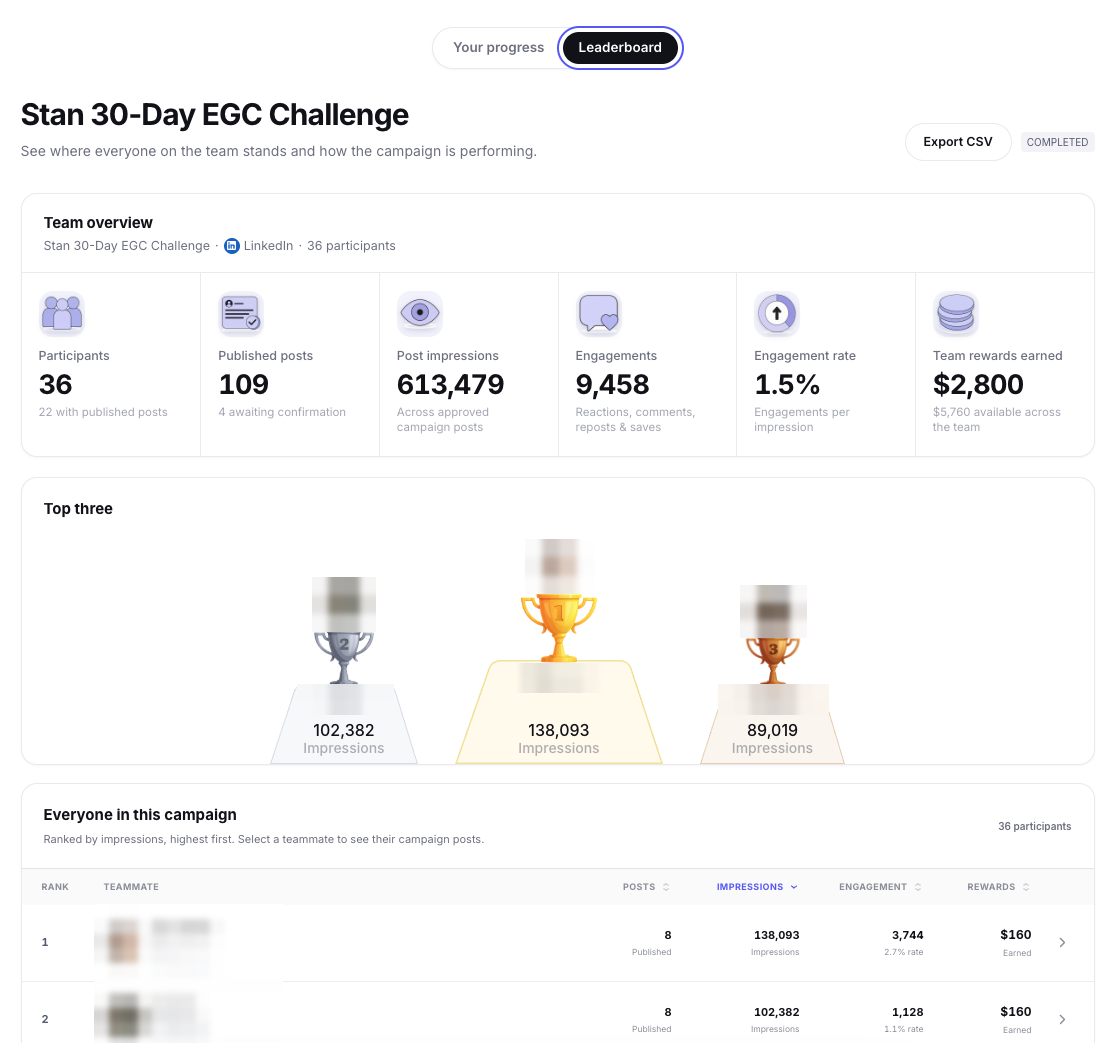
- Engagements, engagement rate, rewards, and a leaderboard.
Stan’s 30-day employee campaign, run on Stanley for Business
36 people took part and 22 published.
Sprout Social Employee Advocacy pricing vs. Stanley for Business
Stanley for Business publishes one unit price. Sprout prices its advocacy add-on by quote, on top of a Sprout plan. List prices on October 7, 2026, before tax.
Stanley for Business
$59 per seat a month
- Includes the AI voice interview, AI drafting and formatting, approvals, publishing, and analytics.
- Optional rewards budget. The fee is added on top: 30% on the first $10,000 of rewards, 20% above that.
Sprout Social Employee Advocacy
Quote for the add-on
- Needs a Sprout plan first. Standard is $199 per seat a month, billed annually [1].
- The add-on is priced on top, by quote [1] [2]. Sprout sells add-ons per user per month [10].
- Sprout’s partner agreement ties advocacy sales to purchased onboarding and implementation, also unpriced [11].
- Sprout’s commissioned Forrester study counts $5,000 of internal labor to implement Sprout [12].
You may see “$89 per user” quoted for Sprout’s advocacy add-on. That was Sprout’s Standard plan price in January 2022 [14]. Ask Sprout for a current quote.
Who each one is best for
Stanley for Business
- Companies of any size where LinkedIn drives awareness, pipeline, or hiring.
- Marketing teams that want authentic, on-brand employee posts and a say on every post, without running the program.
- Experts and executives too: Recruiting & Sales (Done-With-You) and Exec Social (Done-For-You) use interviews with human experts.
Sprout Social Employee Advocacy
- Teams already all-in on Sprout’s suite for their brand channels.
- Teams that want employees resharing company messages, with a social team that has time to curate and push them out.
When Sprout isn’t a good fit
- You want authentic posts from your employees, not company messages pushed down to them.
- You don’t want a lot of admin work curating content and keeping the program running.
- LinkedIn is the channel that matters most to you.
Switching from Sprout, or running both
Replace Sprout’s advocacy add-on, or run Stanley for Business alongside Sprout’s suite. Either way, your employees get authentic LinkedIn posts in their own voice, without your team running the program.
- Share your company page. We write 3 posts for real employees within 24 hours, then walk you through them on a short call.
- Choose who approves posts: your admin or Stanley for Business.
- Each person does an AI voice interview of about 30 minutes.
- First posts can go live in as little as 48 hours from kickoff.
Prefer to start small? Begin with a 90-day pilot.
Sprout Social Employee Advocacy: common questions
What is a good Sprout Social Employee Advocacy alternative for LinkedIn?
Is Employee Advocacy included in Sprout Social plans?
How much does Sprout Social Employee Advocacy cost?
What happened to Bambu by Sprout Social?
Can employees write their own posts in Sprout Social?
Can we use Sprout Social and Stanley for Business together?
Does Stanley for Business write the posts?
How do Stanley for Business rewards work?
How fast can we start?
Get 3 posts for real people on your team within 24 hours.
Send us your company page, and we’ll draft three posts from your actual team that are likely to perform. Free, then a short call to walk you through them.
Get 3 posts in 24 hours
Thanks. We’re on it.
Your 3 posts will be ready within 24 hours. We’ll email to set up a short call.
Thanks, our team will be in touch soon.
Sources
All accessed October 7, 2026. Stanley for Business details reflect our program and pricing as of that date.
- Sprout Social, Pricing (Standard $199 per seat a month, annual billing; Employee Advocacy “Available on Standard plan and up”).
- Sprout Social Support, Understanding Sprout Social Pricing (Employee Advocacy listed as an add-on).
- Sprout Employee Advocacy Support, Adding and sharing Stories.
- Sprout Employee Advocacy Support, How do I use Message Ideas.
- Sprout Employee Advocacy Support, Configuring Employee Advocacy as an Admin (leaderboard, earned media value).
- Sprout Employee Advocacy Support, Release Notes 2026 (impressions, engagements, clicks, earned media value, CSV).
- Sprout Social, Employee Advocacy feature page.
- Sprout Social, Employee Advocacy Security (“Leaderboard configuration”).
- Sprout Social Insights, What is employee advocacy (published November 12, 2025).
- Sprout Social, Inc., Form 10-K for fiscal 2025 (filed February 27, 2026).
- Sprout Social, Partner Program Agreement (effective October 29, 2025).
- Forrester Consulting, The Total Economic Impact of Sprout Social (January 2025; commissioned by Sprout Social).
- Sprout Social, Employee Advocacy customer FAQs (Bambu renamed on October 3, 2022).
- Sprout Social pricing page, Internet Archive snapshot, January 4, 2022.